
Making a cheque payment in Law App follows the same process as making an EFT payment, with one key difference — you change the Fund Type to CHQ.
What happens when you select CHQ
Good to know: Once you’ve started your payment and changed the Fund Type to CHQ, Law App automatically assigns a cheque reference number instead of the usual EFT reference number. No other changes to your workflow are needed.
How to set up your cheque numbering sequence
If you need to update or correct your cheque numbering sequence, follow these steps:
- From the left menu, go to Admin > Transaction Sequencer
- To add a new line, click Add
- Complete the line as shown below — the same setup applies whether you’re configuring General cheque payments or Trust cheque payments, just on their own separate rows
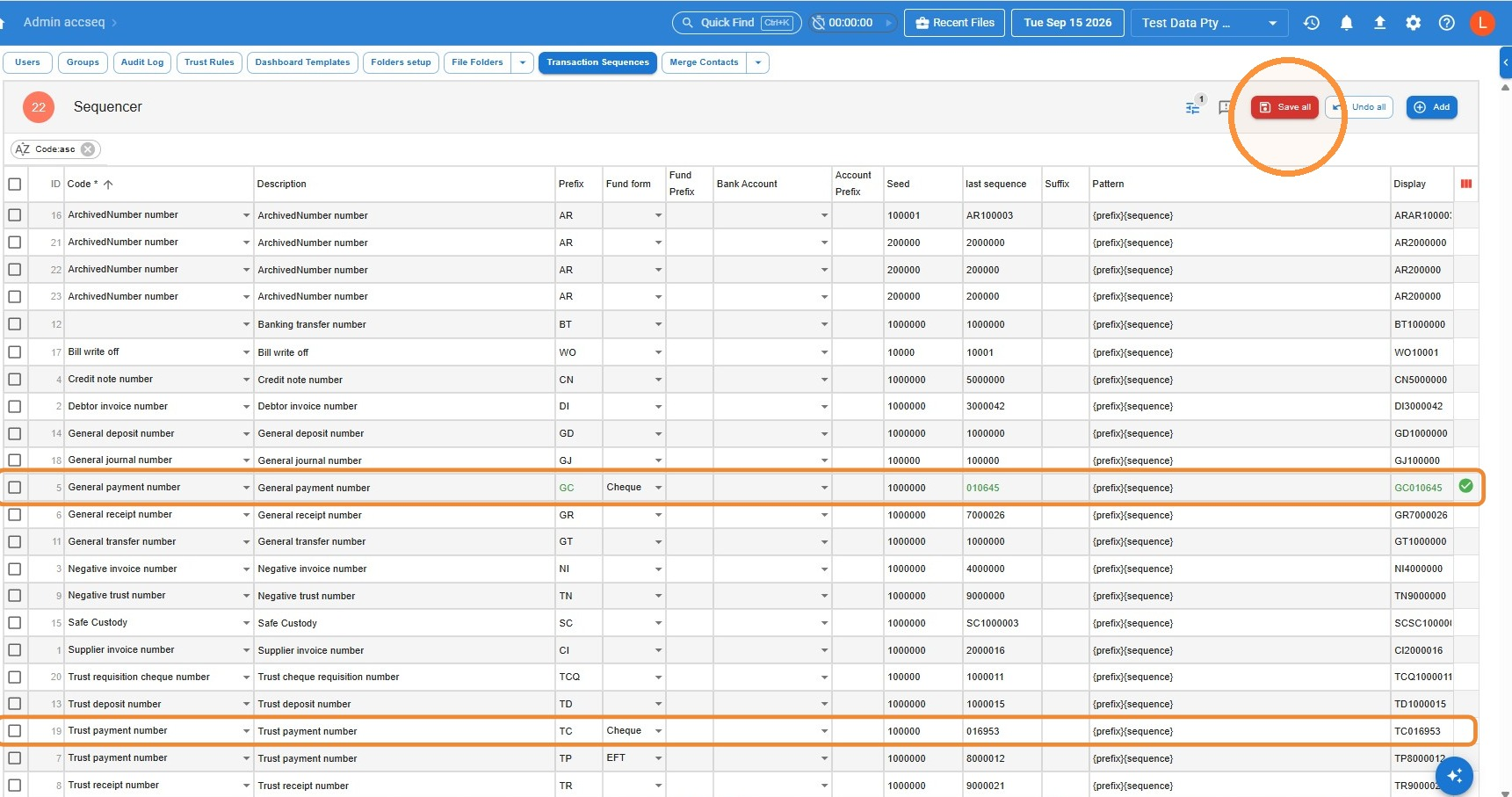
Use the last cheque you used, not the next one. In the “last sequence” column, enter the number of the LAST cheque you used — not the next available one.
Already have a line set up for this? If the line already exists and you just need to correct the numbering, skip adding a new one — simply click into the field you want to change and type.
- Press Save
Leave a Reply