
Law App gives every transaction a reference number automatically — invoices, receipts, payments, trust records and file codes — using a set of rules called Transaction Sequences. Each time you create a transaction, Law App pulls the next number from the matching sequence, so your records stay in order without you tracking numbers by hand.
You’ll find the screen under Admin > Transaction Sequences. Most firms never need to touch it, but you can edit a sequence when you’re moving across from another system or need to line a number up with an outside reference.
How the numbers work
Sequences run on their own. Read on to see what each column on the screen means and why one transaction type can have several sequences.
Reset the next number
Need a sequence to continue from a different number — say, to match your cheque book or a migrated balance? Jump to resetting a sequence below.
Where to find Transaction Sequences
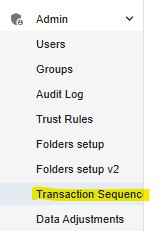
- In the left sidebar, open Admin.
- Select Transaction Sequences.
What each field means
The screen lists every transaction type as a row, with the rule that builds its reference number spread across the columns.
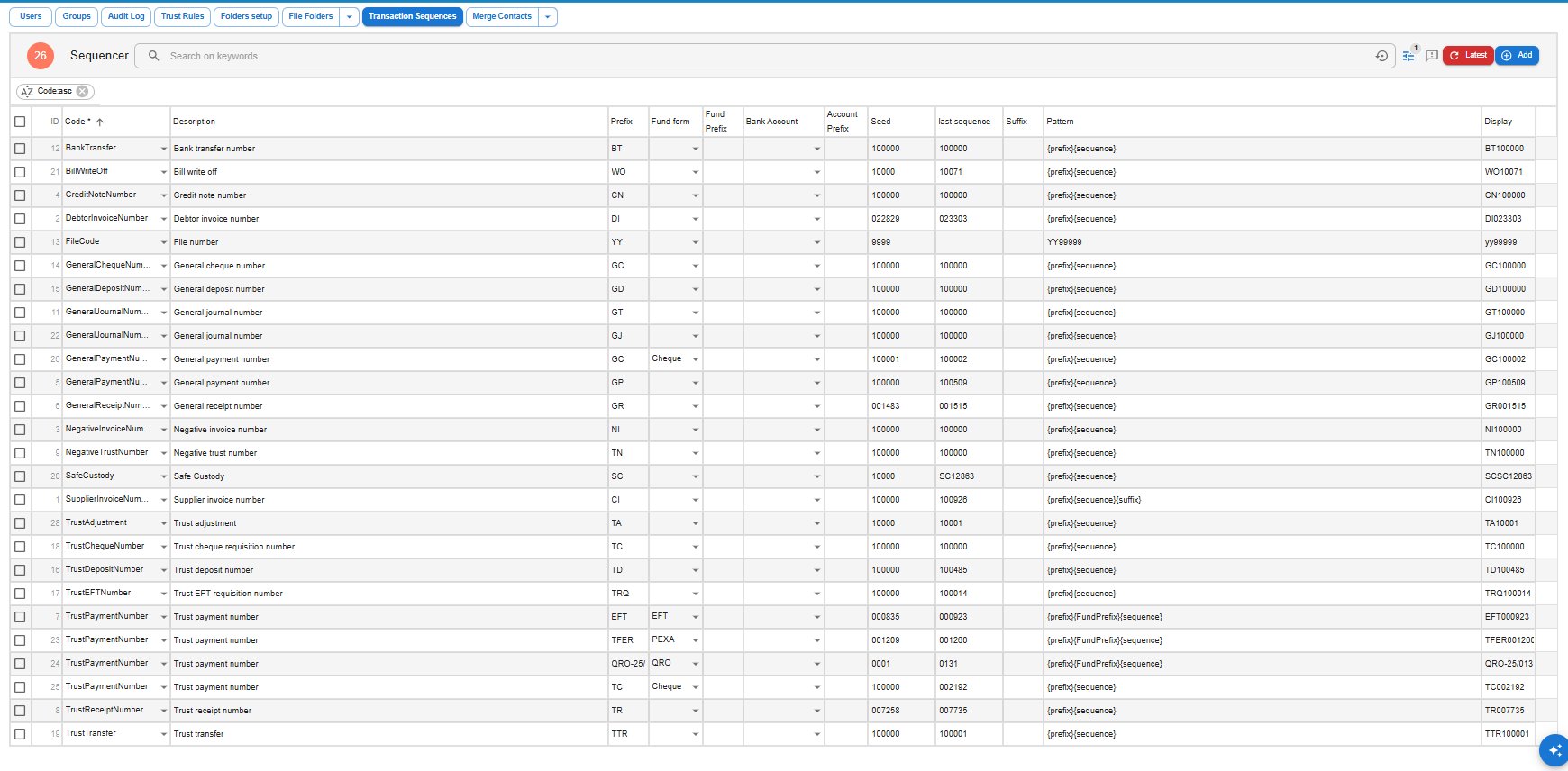
- Code / Description — the transaction type, such as Debtor invoice number or Trust receipt number.
- Prefix — the letters at the start of the reference, such as DI, EFT or TR.
- Fund form — the payment method a sequence belongs to. Where a transaction type can be paid different ways (EFT, Cheque, PEXA, QRO), each method has its own sequence.
- Bank Account — optionally ties a sequence to one specific bank account.
- Account Prefix — an optional prefix linked to that account.
- Seed — the number the sequence originally started from. It does not change what comes next.
- Last sequence — the most recently used number. The next transaction uses this number plus one. This is the field you edit to reset a sequence.
- Suffix — an optional value added to the end of the reference.
- Pattern — the formula that assembles the reference, such as
{prefix}{sequence}or{prefix}{FundPrefix}{sequence}. - Display — a preview of what the current reference looks like.
Why one transaction type can have several sequences
Some transaction types appear more than once because each payment method or bank account needs its own run of numbers. Trust payment numbers, for example, have separate sequences for:
- EFT — prefix EFT, fund form EFT — produces references like EFT000923.
- Cheque — prefix TC, fund form Cheque — produces references like TC002192.
- PEXA — prefix TFER, fund form PEXA — produces references like TFER001260.
- QRO — prefix QRO-25/, fund form QRO — produces references like QRO-25/0131.
General payment numbers work the same way, with separate sequences for EFT (prefix GP) and Cheque (prefix GC). When you choose the payment method on a transaction, Law App automatically draws from the right sequence.
How to reset the next number in a sequence
To make a sequence continue from a different number — for example, to align trust cheque numbers with your physical cheque book:
- Go to Admin > Transaction Sequences.
- Find the entry you want. Use the search bar, or sort by the Code column.
- Set Last sequence to the number just before the one you want used next.
- Click Save. Use Get Latest Data to refresh the list if needed.
For example, if your next cheque should be number 1050, set Last sequence to 1049. If the last debtor invoice was DI023303, leaving it as is means the next one will be DI023304.
When should you change a number?
Most of the time you don’t — Law App keeps numbering for you. It’s worth editing a sequence when you are:
- Moving across from a legacy system and continuing an existing number run.
- Matching a specific external or regulatory reference.
- Aligning a sequence with a physical cheque book.
- Fixing a duplicate or skipped number.
Each number should stay unique, so avoid setting a sequence back to a value that has already been used.
Common questions
What if I used the wrong number?
You can adjust it from the Transaction Sequences screen. Set Last sequence so that future entries won’t clash with numbers already issued.
Can I use a different number format?
Not freely. Patterns follow {prefix}{sequence} or a variant that adds a fund prefix or suffix. If you need a particular format, let support know and we’ll see what’s possible.
Leave a Reply