
You can consolidate or clean up rate codes by merging them and removing unused ones. This is useful when multiple codes are no longer needed or should be unified under a single label.
Steps:
- Go to the Import menu
From the left-hand navigation, select:
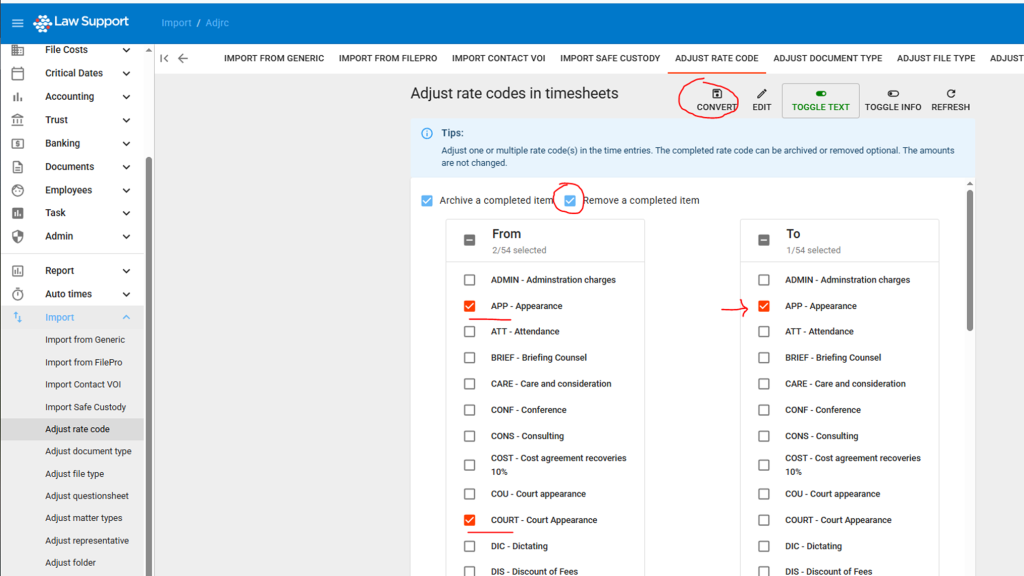
Import → Adjust rate code - Select the codes to remove
- In the From column, tick the rate code(s) you want to remove.
- In the To column, choose the code where any existing time entries should be reassigned.
- Enable removal
- Tick the checkbox for “Remove a completed item” at the top of the screen.
- This ensures the selected rate code is deleted after the reassignment is complete.
- Press Convert
- Click the Convert button at the top of the screen to confirm the merge and remove the selected rate code(s).
✅ We highly recommend removing unused rate codes, as they can be re-added later if needed.
📁 Archiving is also available if you prefer to retain the code in a non-active state.
Leave a Reply