
Refunds can occur for many reasons, including overpayments, disbursement corrections, discounts, or write-offs. Law App provides flexible ways to manage these situations while keeping accounts accurate and compliant.
1. Client Overpayment
Scenario: A client has accidentally paid more than the amount shown on their invoice.
Option 1 – Simple Receipting with Suspense (external handling):
- Receipt the correct amount as a normal debtor receipt.
- Receipt the overpaid portion as a general ledger receipt into your suspense account.
- When issuing the refund, pay the excess back to the client from the suspense account (via EFT or cheque).
Use this method if you want to keep the file clean and track the refund externally.
Option 2 – File-Based Handling (internal handling):
- Create a Disbursement Payment for the amount that must be refunded.
- Bill the disbursement, which generates a new invoice for that refund amount.
- Allocate the original overpayment against this new invoice.
- Refund the money to the client via EFT or cheque.
Use this method if you prefer a complete transaction trail within the client file.
2. Refund of Overcharged Disbursements
Scenario: An external authority or supplier overcharged a disbursement (for example, a filing fee) and later refunds the difference.
Option 1 – Simple Receipting with Suspense (external handling):
- Record the disbursement at the correct amount on the file.
- When the refund is received, receipt the overpaid portion into your suspense account.
Option 2 – File-Based Handling (internal handling):
- Create a Disbursement Payment for the refunded amount, representing the money going back to the supplier.
- Bill the disbursement to generate a new invoice.
- Allocate the refund you received against this new invoice.
Tip: Always replicate the GST settings from the original disbursement so that tax reporting remains consistent.
3. Refund of Supplier Disbursements
Scenario: A supplier or authority refunds a disbursement you previously paid in full (for example, a search fee or court fee that was not required).
Steps:
- Enter a negative disbursement on the file for the refund amount, or adjust the original disbursement to show the reversal.
- Ensure the GST treatment matches the original transaction (taxable or GST-free).
- Reconcile the refund payment (EFT or cheque) against the negative disbursement or adjusted entry.
This ensures the file correctly reflects both the original outlay and the refunded amount.
4. Discounts and Adjustments
Scenario: An invoice needs to be reduced after it has been issued, either for goodwill or negotiation reasons.
Steps:
- Open the invoice and add a discount line for the agreed reduction.
- Confirm that the adjustment is applied before receipting so that GST is recalculated correctly.
- Re-issue the invoice to the client, clearly showing the discount.
This keeps the adjustment transparent and maintains compliance in GST reporting.
5. Bad Debt Write-Offs
Scenario: A client cannot pay all or part of their invoice, and the balance must be written off.
Steps:
- Create a bad debt adjustment against the outstanding invoice.
- Apply the adjustment so that the balance is reduced to the amount actually recoverable.
- Ensure the adjustment is coded correctly so that GST is reduced or adjusted in compliance with reporting requirements.
This provides a clear record that the invoice was not fully recoverable while keeping reporting accurate.
6. Credit Notes Against Finalised Debtor Invoices
Scenario: A debtor invoice has already been finalised, but a correction is needed — for example, the wrong fee earner rates were applied, or professional fees were overcharged.
Because the original invoice is already finalised, it cannot be edited directly. Instead, you need to create a credit note to reverse or adjust the incorrect amount. There are two ways to do this in Law App.
Option 1 – Negative Time Entries:
- Go to the matter file and enter new time entries for the amount to be credited, using a negative amount.
- Bill those negative time entries as you normally would.
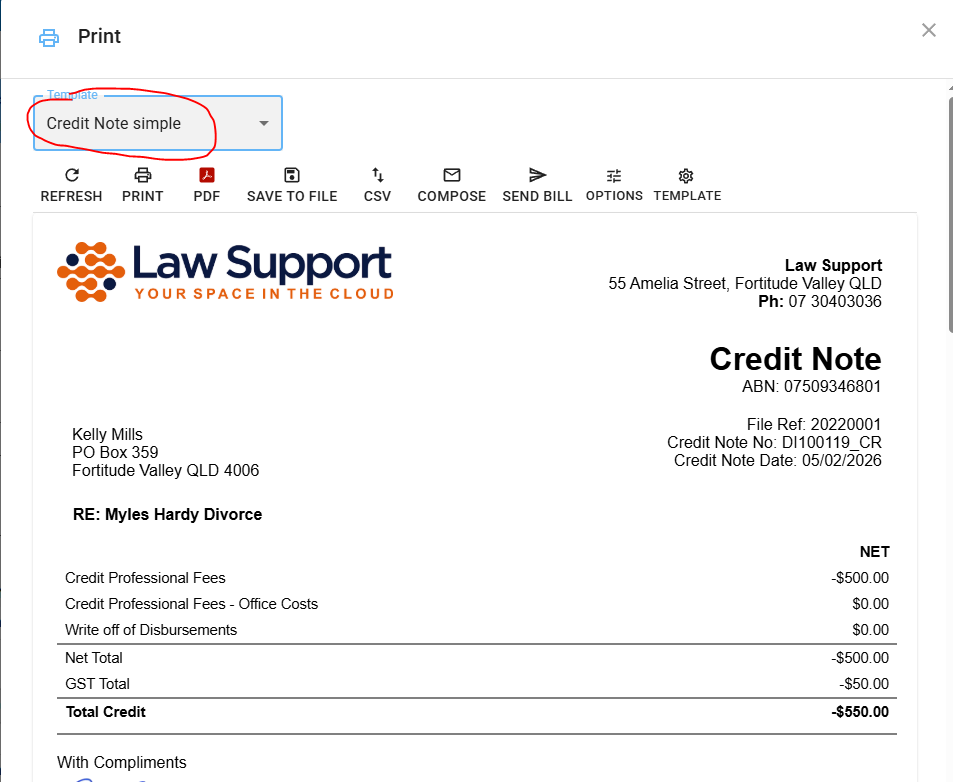
- From the invoice list, select the Credit Note layout for the newly created invoice.
- Issue the credit note.
Use this method when the correction relates directly to time-based charges and you want the credit to flow through as a time entry adjustment.
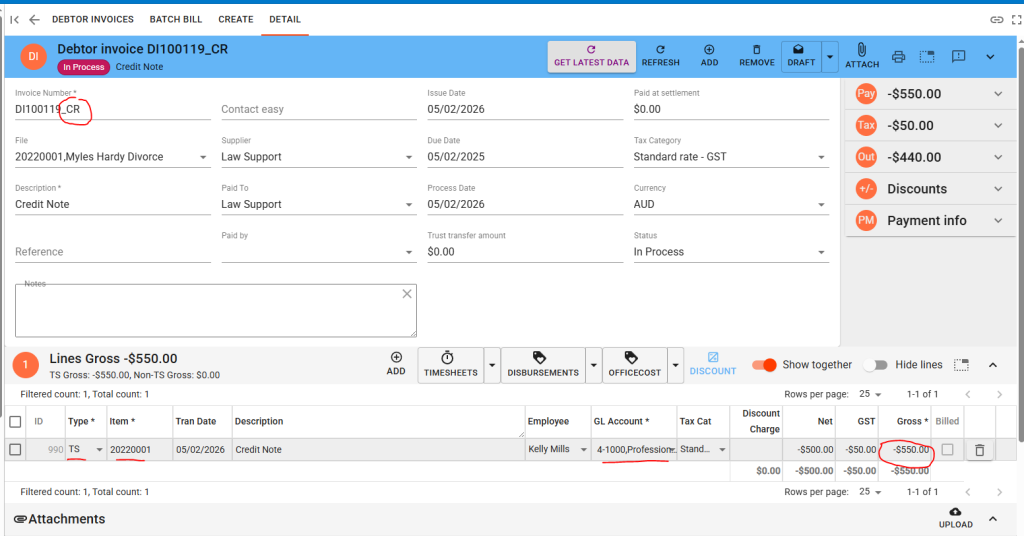
Option 2 – Add a Line to a Debtor Invoice:
- Go to the matter file and add a new debtor invoice.
- Press + to add a line to the invoice.
- Set the line type to TS (Time/Service) and the GL code to Professional Fees.
- Enter the relevant fee earner.
- Enter the credit amount as a negative value.
- From the invoice list, select the Credit Note layout for this invoice.
- Issue the credit note.
Use this method when you want to apply the credit directly as an invoice line item without creating separate time entries.
Tip: Always ensure the credit note references the original invoice number so that both documents can be matched for audit and reporting purposes.
Best Practice for All Refunds
- Always confirm whether GST applies (GST-inclusive, GST-exclusive, or GST-free).
- Complete all allocations and adjustments before generating GST or compliance reports.
- Use a suspense account only as a temporary holding method for external refunds.
- Record the refund method (EFT, cheque, or adjustment) for audit and compliance clarity.
- When issuing credit notes, always use the Credit Note layout from the invoice list to ensure the document is clearly identified as a credit.
Updated on 5 February 2026
Tags: Bad Debts, Billing Accuracy, Client Billing, Compliance, Credit Notes, Disbursements, Discounts, GST, Invoice Management, Law App, Legal Accounting, Overpayments, Refunds, Supplier Refunds, Trust Accounting
