
From 1 July 2026, Australia’s AML/CTF reforms — the Tranche 2 changes — bring law firms into the anti-money-laundering regime for the first time. To help you meet these obligations as part of your normal workflow, Law App’s AML/CTF compliance tools rolled out to every firm in June 2026, ahead of the 1 July commencement date. You get identity verification that actually stores the data, client risk ratings worked out from your answers, and a clear AML status on every matter.
What the AML/CTF compliance tools cover
The new tools split cleanly into what Law App does for you, and what stays your firm’s responsibility.
Identity, risk and reports
- Stores all your VOI in one place — captured in person as well as electronic InfoTrack checks
- Records risk assessments and sets review dates automatically
- Shows live AML status on every matter and across the file list
- Produces CDD checklists and reports from what you record, ready for your firm to lodge with AUSTRAC
Enrolment, documents and lodgement
- Enrol with AUSTRAC and appoint your compliance officer
- Set up your AML/CTF documents and policies — AUSTRAC’s free kit is built for this
- Lodge the reports through the AUSTRAC portal
- Manage any compliance that sits outside Law App
What’s changing on 1 July 2026
Only “designated services” — such as conveyancing and property settlements — trigger the new obligations. Most litigation, family and criminal work is not captured. If your firm provides a designated service, you become a reporting entity and must verify clients, assess risk and keep records.
Identity and AML in one place
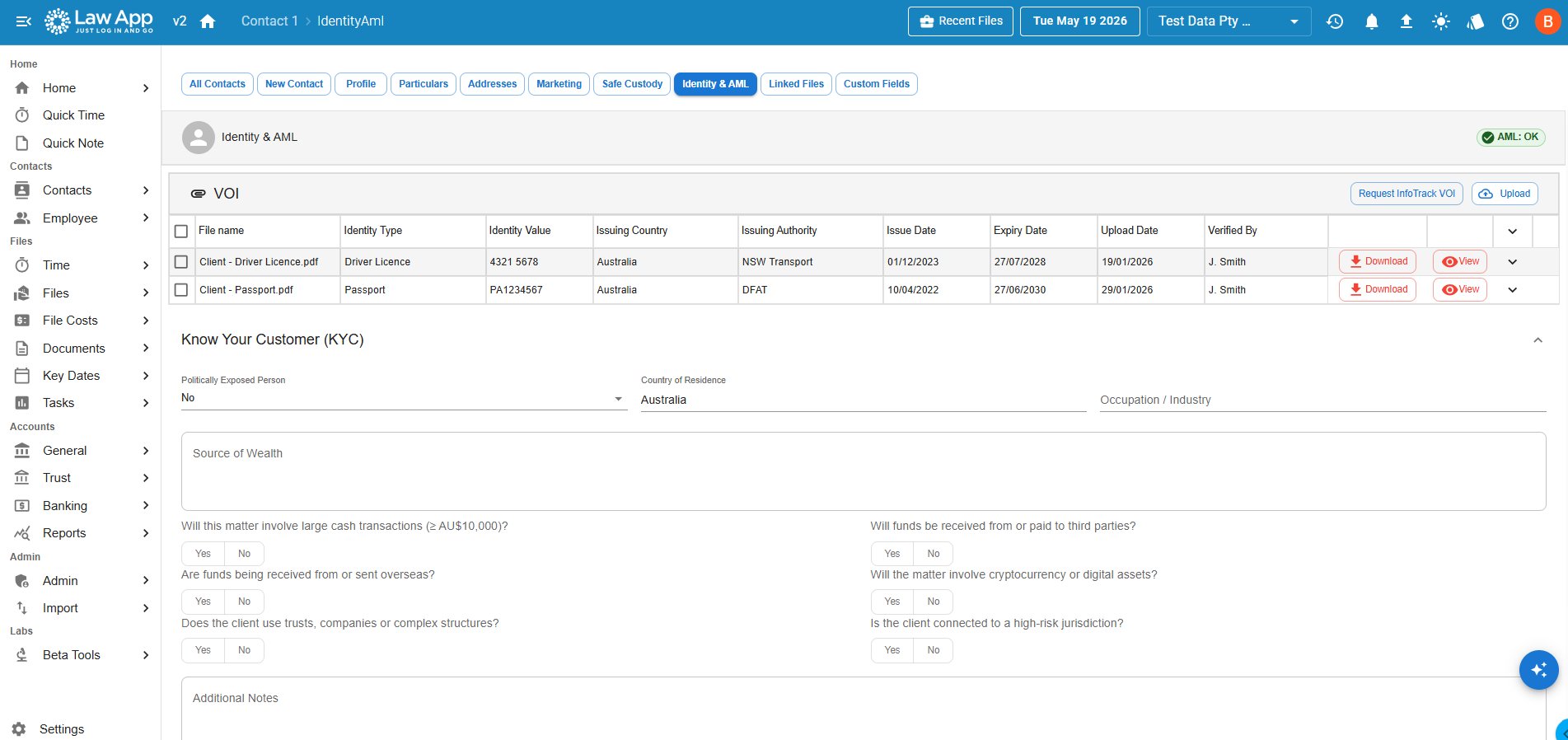
Verification of identity (VOI) and your AML risk assessment now live together on the contact, under a new Identity & AML tab. Because identity belongs to the person and not the matter, it is stored once on the contact and follows them across every file they are involved in. Importantly, Law App keeps all of your VOI in one place — the identity documents your team captures in person, which is still how a large share of VOI is done, as well as electronic checks. You can upload documents yourself, or click Request InfoTrack VOI to run an electronic check.
When InfoTrack returns a result, Law App stores the detail — document type, number, issuing authority and, importantly, the expiry date — so you keep the verified data, not just a link to a document you cannot read back later.
Client risk ratings, worked out for you
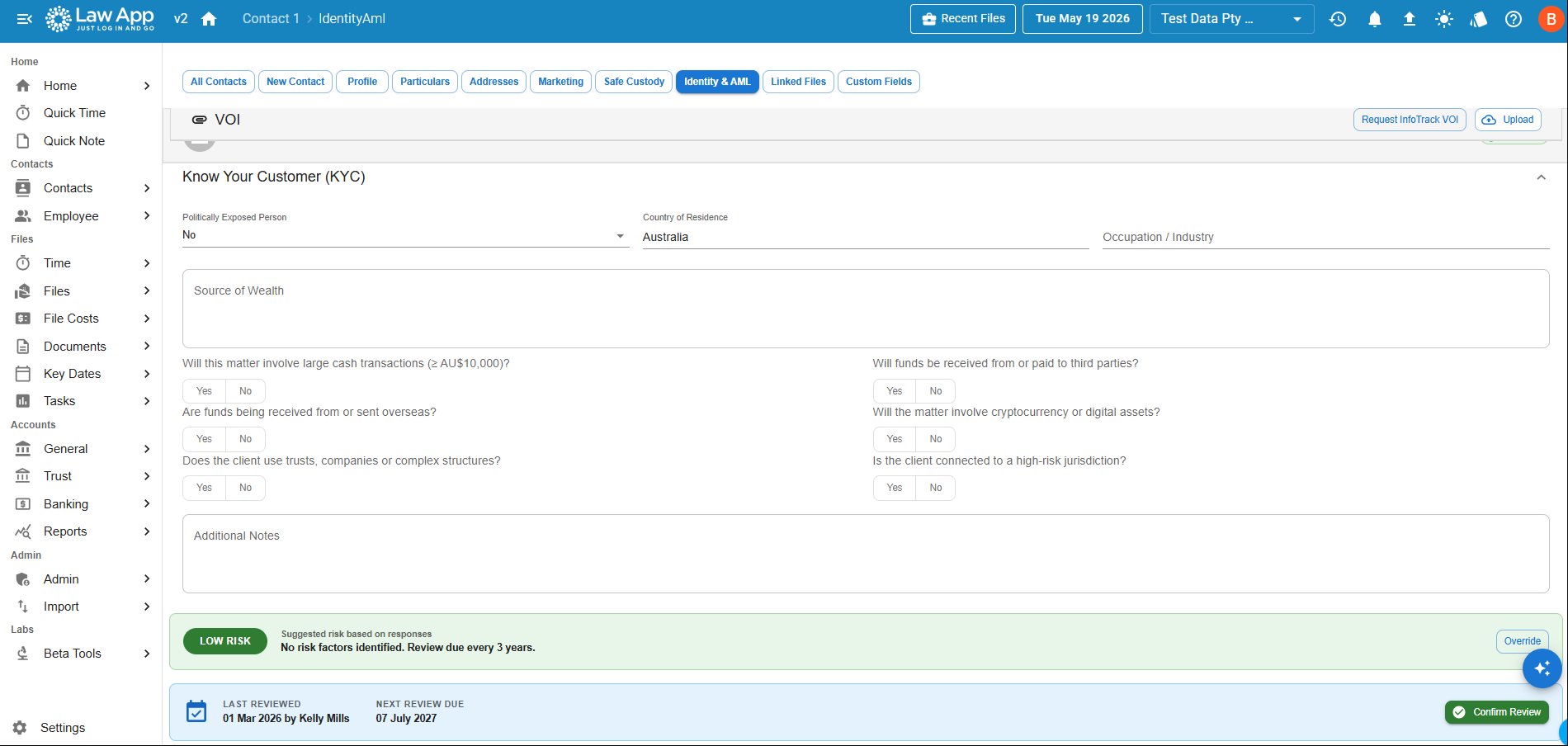
Answer a short set of risk questions and Law App suggests a rating — Low, Medium or High — based on the responses. The rating sets the review cycle automatically: Low is reviewed every three years, Medium every two years, and High every year. Law App records who completed the review and when, and calculates the next review date for you.
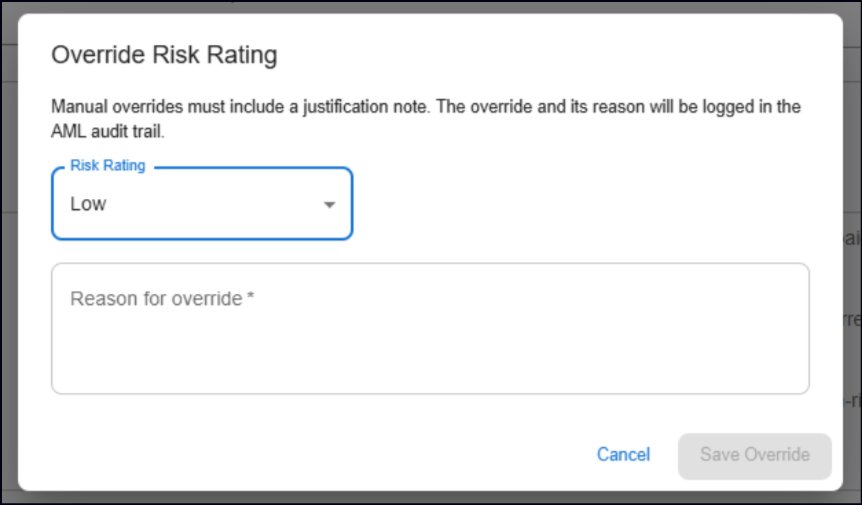
If you disagree with the suggested rating you can override it — but Law App asks for a reason, and both the override and its justification are written to the AML audit trail. That keeps the file defensible if you are ever asked how a rating was reached.
AML status on every matter at a glance
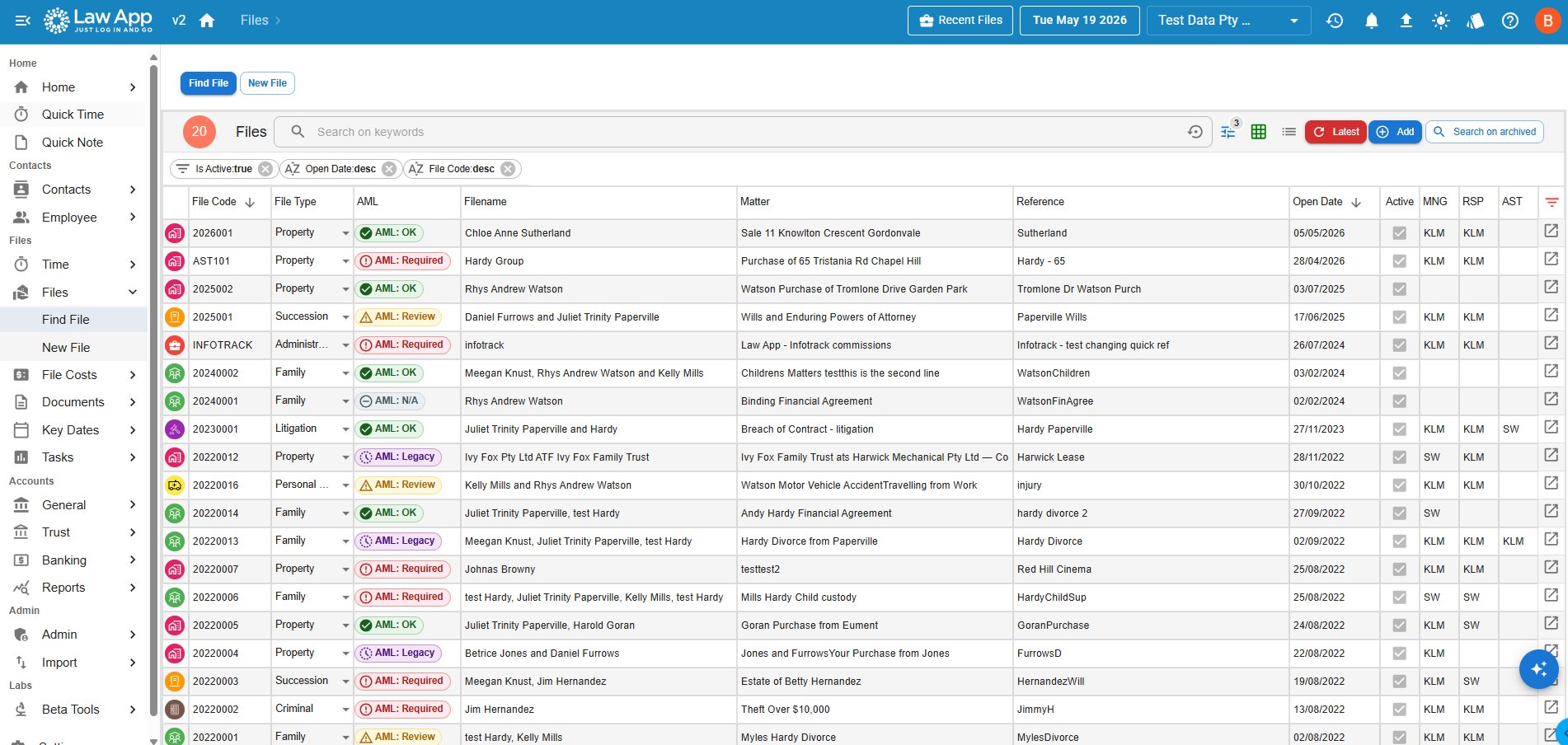
You should not have to open a file to know where it stands. A new AML column on the file list shows the status of every matter at a glance: green OK means every client is verified and assessed; orange Review means a review or document is due soon; red Required means a client still needs identity verification or a risk assessment; grey N/A means the matter is not a designated service; and grey Legacy marks pre-commencement matters opened before 1 July 2026, which are not required to be verified retrospectively.
Open a matter that is not compliant and you will see the same status as a pill beside the file name, plus a banner spelling out exactly which clients still need attention. The clients grid on the file also shows an AML status against each person, so you know who to chase.
Running identity and ASIC searches from a contact
You can now start identity (VOI) and ASIC searches directly from a contact, not only from inside a file. Because every search has a cost, Law App asks you to choose a file when you run one, so the disbursement is recorded against the right matter. The completed search is then saved in two places — under that file, and in the contact’s VOI area — so the verified identity stays with the person for their future matters. Your AML risk assessment and a matter’s identity-verification sign-off continue to be completed at the file level.
Your AML/CTF documents, and what Law App adds
Your AML/CTF documents — your risk assessment and your policies — are something your firm puts in place and owns. You do not have to write them from scratch: AUSTRAC publishes a free starter kit for legal practices that most small firms can customise and adopt, with a separate kit for conveyancing if your firm does both. Law App handles the parts that live in your day-to-day system: verifying clients, recording risk assessments, keeping those records for the seven years the law requires, and producing the checklists and reports you lodge with AUSTRAC. Law App is not a lodging tool and does not submit on your behalf.
Leave a Reply