
🔹 How It Works
- You can set any whole number increment (e.g. 1, 5, 6, 15).
- Increments can be configured by:
- Firm
- Region
- Individual employee
This means you can track time as precisely as you like internally, while billing and displaying entries in whatever format suits your practice.
📤 Displayed/Billed Externally
- Most firms display time in 6-minute units (0.1 hour) for billing.
- Internally, users can still record time in smaller units (e.g. 1-minute increments).
🔧 How to Adjust Your Time Entry Increment
To update the time rounding settings:
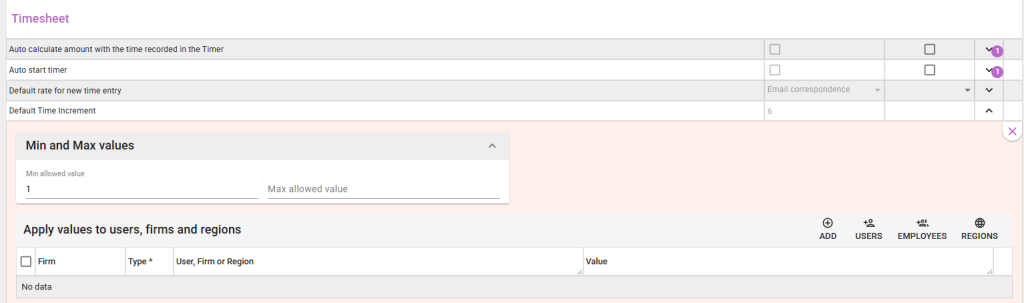
1. Go to the Settings area (bottom of the left-hand menu — look for the cog icon)
2. Choose Firm Settings
3. Scroll down to the Time Sheets section (as shown in the image)
4. Adjust the billing increment to your preferred value
💡 Example
Law App allows both — Joe’s time is accurate, clients see clean, standard billing units
Your firm bills in 6-minute increments
Joe prefers to enter time in 1-minute increments
What this means:
Leave a Reply