
Budgets holds two kinds of budget: what each fee earner is expected to record, bill and recover, and the fee limits quoted on files. This help sheet explains each tab. For working with a budget on a file, see How to manage File Budgets in Law App.
How to get there
- From the left menu, click Settings, then Budgets.
- Use the tabs: Budget Entry, Budget Defaults, Fee Limit Alerts and File Budget Groups.
Budget Entry
Each fee earner’s budget inputs for a financial year. You enter the inputs and Law App works out the monthly target. You never type the target itself. Pick the Financial year, Month, Team and the date the figures are Effective from, then fill in each person’s row and click Save all. How to use this walks you through the page.
| Column | What it’s for |
|---|---|
| Hrs / day | The billable hours you expect on a normal working day, not a monthly total. The calendar does the rest. |
| Working week | The days the person works. Leave and public holidays come off automatically. |
| Charge rate | What an hour of their time is charged at, for the budget. |
| Cost rate | What an hour of their time costs the firm. Only administrators can see and change it. |
| Time, Billed, Recovered | The percentages for this person, if different from the firm defaults: time recorded out of hours available, billed out of time recorded, and recovered (paid) out of billed. |
| Monthly target | Worked out by Law App from the above. “No target yet” until there’s enough to work it out. |
Budget Defaults
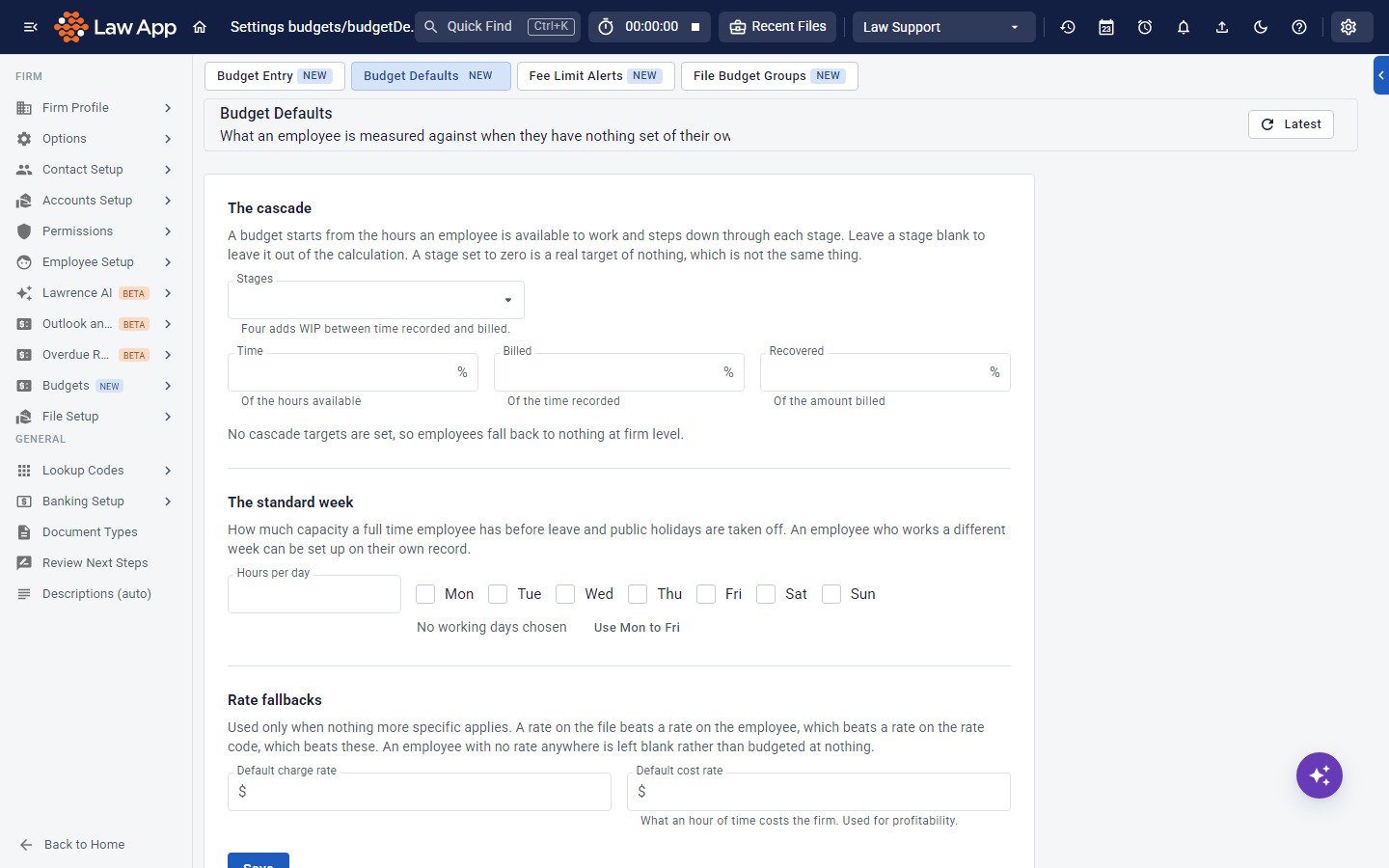
What a fee earner is measured against when nothing is set on their own row.
| Section | What it’s for and what it changes |
|---|---|
| The cascade | A budget starts from the hours a person is available and steps down: Time (% of the hours available), Billed (% of the time recorded) and Recovered (% of the amount billed). Choosing four stages adds work in progress between time recorded and billed. Leave a stage blank to leave it out. A stage set to zero is a real target of nothing, which isn’t the same thing. |
| The standard week | How many hours a day a full-time person works, and which days, before leave and public holidays come off. Someone with a different week can be set up on their own record. Use Mon to Fri ticks the usual days. |
| Rate fallbacks | A Default charge rate and Default cost rate, used only when nothing more specific applies. A rate on the file beats a rate on the employee, which beats a rate on the rate code, which beats these. Someone with no rate anywhere is left blank rather than budgeted at nothing. |
Fee Limit Alerts
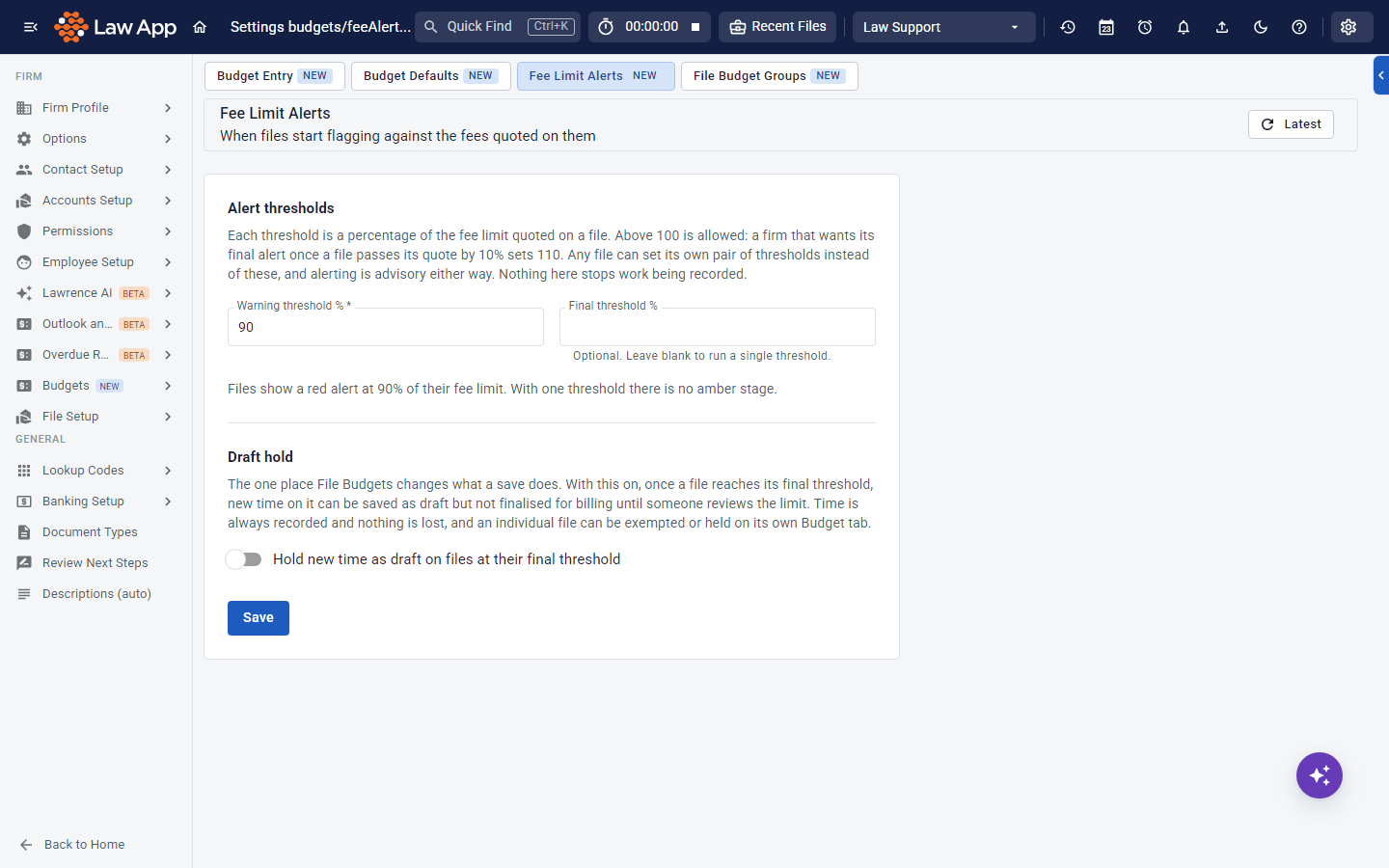
When files start flagging against the fees quoted on them.
| Setting | What it’s for and what it changes |
|---|---|
| Warning threshold % | The percentage of a file’s fee limit at which it first flags. With only this one set, files show a red alert at that point. |
| Final threshold % | Optional. With both set, files show amber at the warning threshold and red at the final one. Above 100 is allowed: 110 flags a file once it passes its quote by 10%. |
| Hold new time as draft on files at their final threshold | On: once a file reaches its final threshold, new time on it can be saved as draft but not finalised for billing until someone reviews the limit. Time is always recorded and nothing is lost. |
Alerts are advisory and never stop time being recorded. Any file can set its own thresholds, or be exempted or held, on its own Budget tab.
File Budget Groups
The standard phases offered when someone adds a phase to a file’s budget, one list per file type (Conveyancing, Family, Litigation and so on). Picking a phase copies its name and default estimate onto the file, so editing a list here only affects phases picked from it afterwards. Retiring a phase takes it out of the pick list and leaves files that already use it alone. A file type with no list yet has its phases typed by hand.
Questions
How do I change when files warn us they’re near their fee limit? Go to Settings, Budgets, Fee Limit Alerts and set the warning and final thresholds as a percentage of the file’s fee limit.
Why can’t I finalise time on a file that’s over its fee limit? Your firm has turned on the draft hold in Fee Limit Alerts. The time stays in draft until someone reviews the file’s fee limit.
How do I set a fee earner’s budget? Go to Settings, Budgets, Budget Entry and enter their hours, working week, rates and percentages. Law App works out the target.
Leave a Reply