
The latest AML update in Law App gives you a proper way to record who sits behind an organisation client, who is acting on a client’s behalf, and what your firm has reported to AUSTRAC. It adds entity types for organisations, a people register for directors and beneficial owners, a representatives register, sole trader details, a printable KYC Assessment Record, new AML tools on the matter, and a firm-wide AML/CTF register under Reports. This article walks through what’s new and what you’ll notice day to day.
Identity & AML tab
Entity identity card, people register, beneficial owner exemption, representatives, sole trader details and the KYC Assessment Record.
File Details, Reports and Settings
A new AML row on the matter (Risk, Report, AUSTRAC Form), the AML/CTF register, a designated-service auto-flag setting and Client Intake questions.
The organisation card now follows the entity type
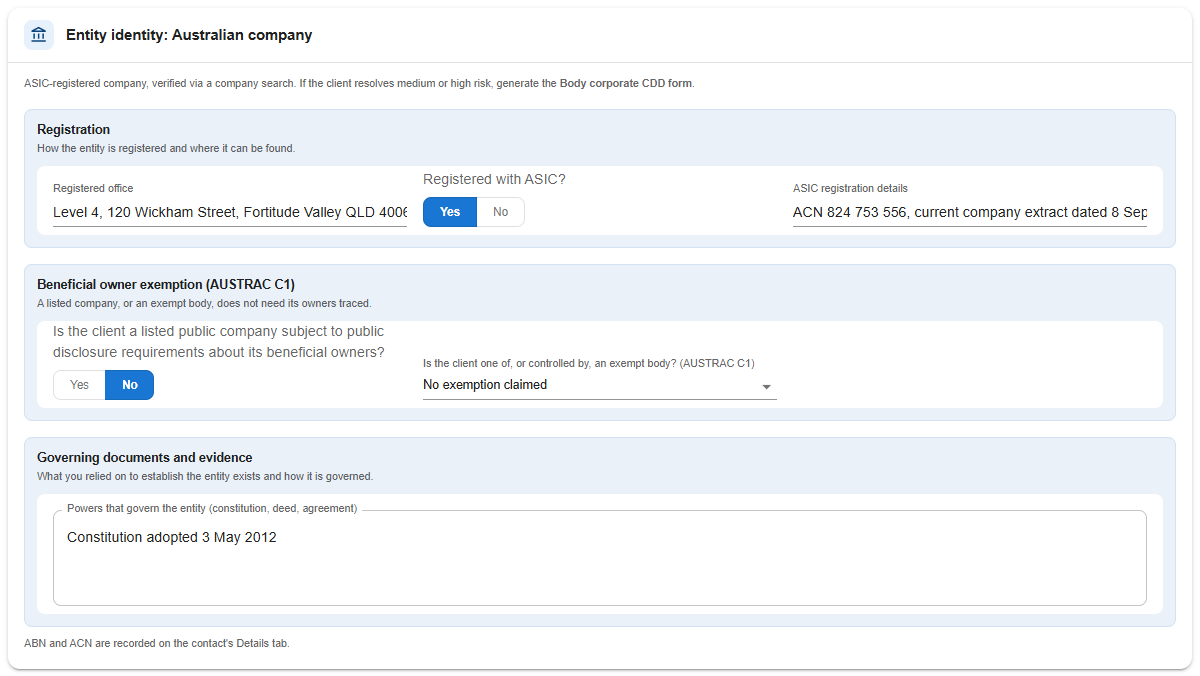
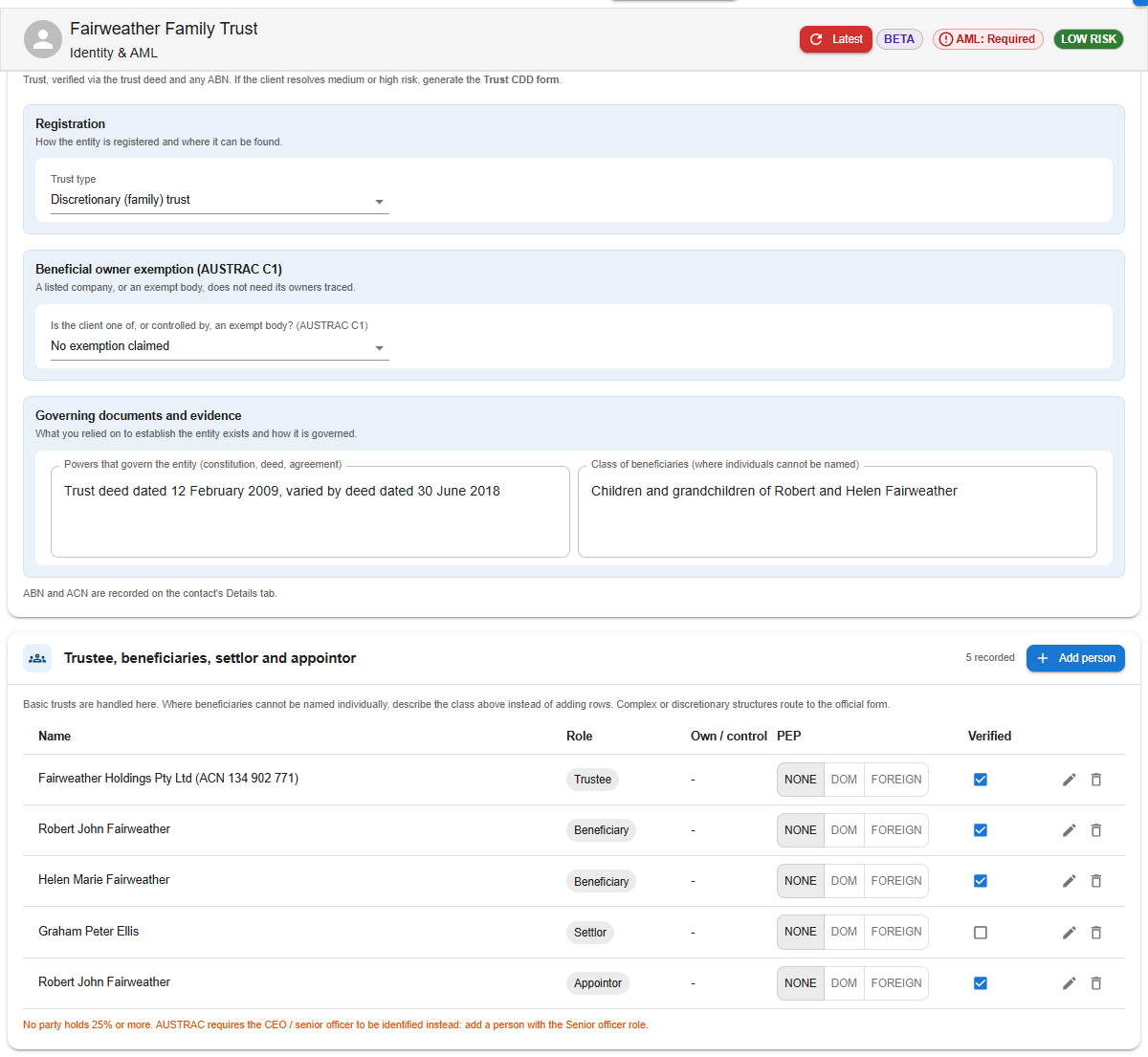
An organisation’s Identity & AML tab now opens with an Entity identity card. Start by picking the entity type: Australian company, Trust, Partnership, Foreign company, Government body, or Other / association. The card then shows only the identity details AUSTRAC asks for that type of entity, grouped into three tinted sections:
- Registration — the registered office, ASIC registration and details, and whether the company is publicly listed (and on which exchange). For a trust, this is the trust type and class of beneficiaries; for a foreign company, the overseas registration number; for a government body, the jurisdiction.
- Beneficial owner exemption (AUSTRAC C1) — covered in the beneficial owner exemption below.
- Governing documents and evidence — the constitution, trust deed or partnership agreement that governs the entity. For a government body, this is the evidence that it exists.
The entity type also decides which people you record in the register underneath (directors for a company, trustee and beneficiaries for a trust, partners for a partnership, and so on), and which official AUSTRAC form applies if the client rates above low risk.
 For a foreign company, the card adds a reminder to consider the medium- and high-risk country questions. The reminder is a prompt only — you still need to answer those questions yourself.
What happens to existing organisation clients
Organisations assessed before this release show a blue note at the top of their Identity & AML tab, explaining that they were assessed before entity details and the people register existed, and that they are due at their next review. Their current AML status stands until then.
 When that review comes round, set the entity type and fill in the people register as part of re-answering the questions. You can do this earlier if you like — the note disappears as soon as an entity type is saved.
New: a register for directors, beneficial owners and other key people
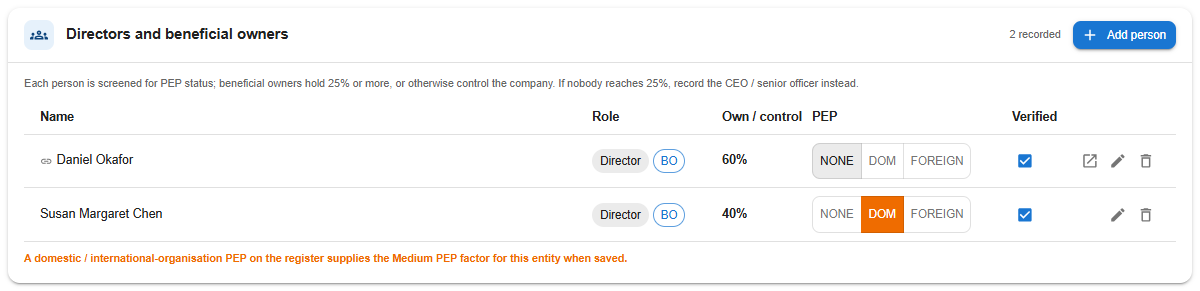
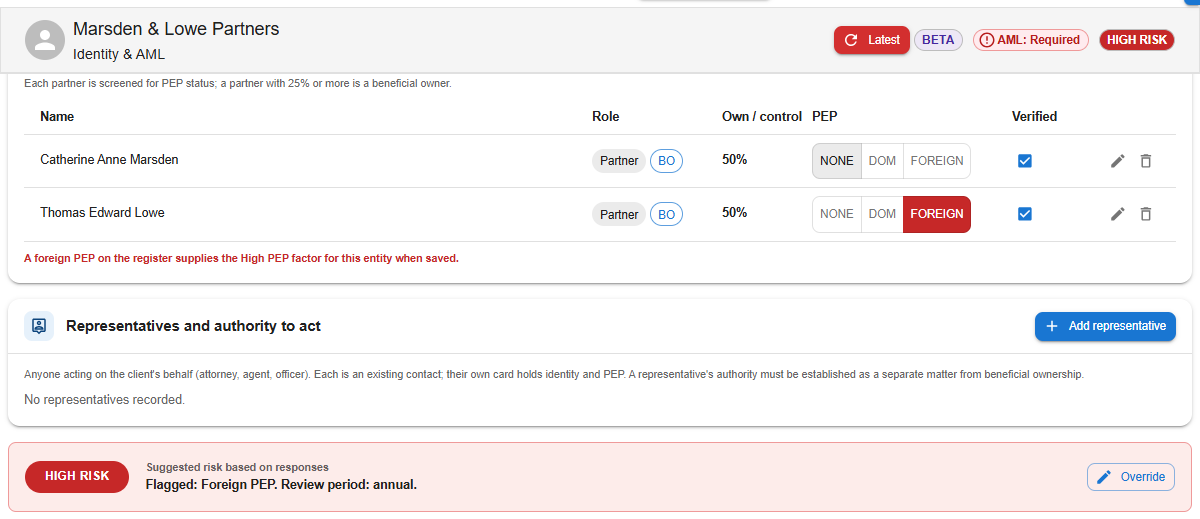
Below the entity card is a register of the people behind the entity. A beneficial owner is anyone who owns or controls 25% or more of the entity. The register’s heading changes with the entity type:
- Directors and beneficial owners — company
- Trustee, beneficiaries, settlor and appointor — trust
- Partners — partnership
- Office holders and controllers — association
- Authorised representative — government body
How the people register works
- Blank rows to start you off. When the register is empty, the usual roles are pre-filled as blank rows — two directors and a beneficial owner for a company; a trustee, beneficiary, settlor and appointor for a trust. Fill them in, add more, or remove the ones you don’t need.
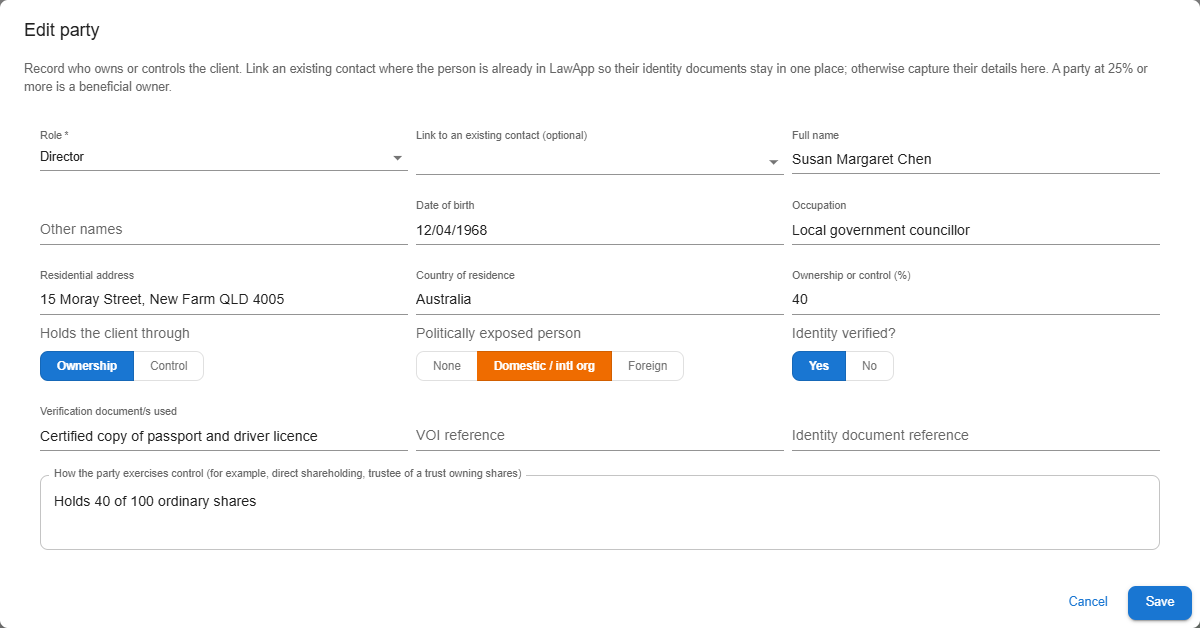
- What each row records. Full name, other names, date of birth, residential address, country, occupation, ownership percentage and how the person controls the entity, plus the documents you verified them against.
- Beneficial owners are flagged automatically. Anyone with 25% or more ownership or control gets a BO chip, whatever their title. If nobody reaches 25%, record the CEO or a senior officer instead.
- PEP status is set per person. Choose None, Domestic or Foreign for each person. (A PEP is a politically exposed person.)
- Verified tick. Tick Verified once you hold identity evidence for the person. Unverified rows are shown as unverified on the record.
- Link to an existing contact. Pick the contact in the edit dialog. Linked rows show a link icon and an open contact button, and the person’s own card holds their identity documents and PEP details.
- Saving. Save in the edit dialog writes the register straight away. Removing a row asks you to confirm. Rows you’ve added but not yet saved show an Unsaved – press Save chip.
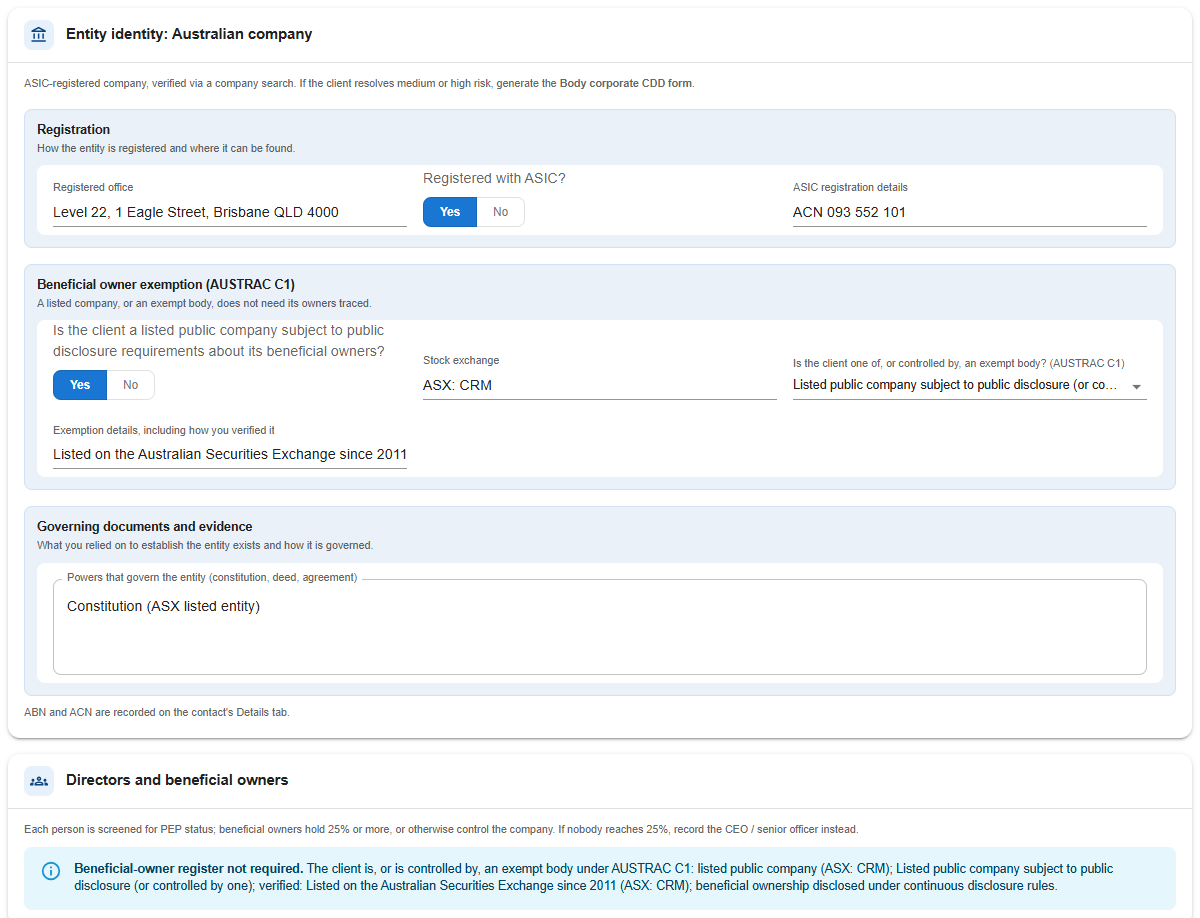
New: the beneficial owner exemption (AUSTRAC C1)
Some organisation clients don’t need a beneficial owner register. Record this in the Beneficial owner exemption group on the entity card by selecting what the client is, or is controlled by:
- Government body or Publicly listed company — the register is switched off completely, and the card shows Beneficial-owner register not required.
- Regulated entity (for example, an Australian financial services licensee) or Strata / body corporate — the register is switched off only while the client stays Low risk and has no open escalation. If the rating goes up or a matter is escalated, the card shows The C1 exemption no longer applies. and the register is required again.
New: representatives and authority to act
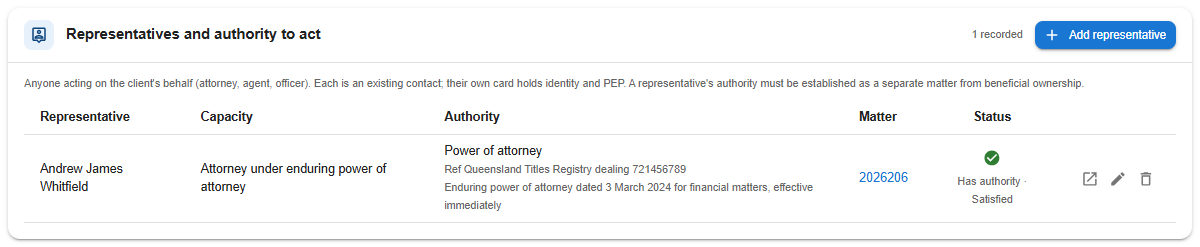
When someone deals with you on the client’s behalf — an attorney under a power of attorney, an agent, an officer of a company client, or a family member with written authority — record them in the new Representatives and authority to act register. It appears on both individual and organisation cards.
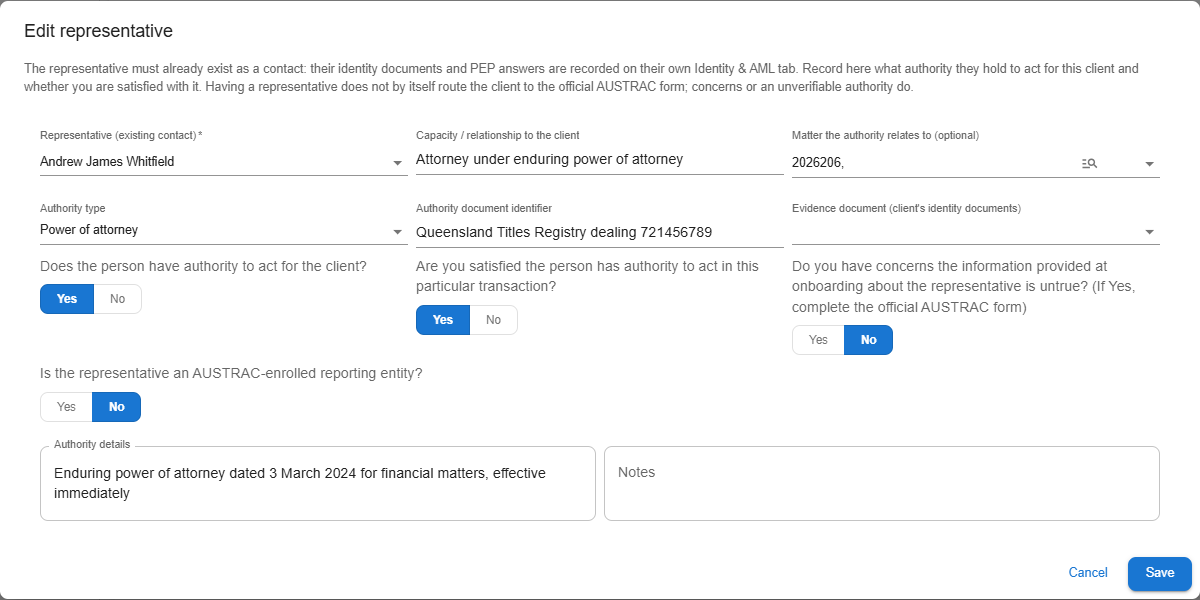
- Representatives are always existing contacts. Search for and pick the contact. Their identity documents and PEP questions live on their own card; this register only holds the facts about their authority.
- What you record. Their capacity, whether they’re AUSTRAC enrolled (and the details), whether they have authority to act, the type of authority (power of attorney, agency agreement, written authorisation, office held, or other), the details and any unique identifier (for example, the Titles Registry dealing number), and optionally the identity document on the client’s card that evidences the authority.
- Confirming authority. Tick Satisfied the person has authority to act once you are.
- Linking to a matter. A representative can be tied to a particular matter, which opens in a new tab from the row.
New: sole trader details for individual clients
The individual question set now includes a gate question: is this person a sole trader? It must be answered Yes or No before the review clock starts, just like the other questions.
Answer Yes and a Sole trader card appears with two groups:
- Business profile — business name, business address, business activity, GST registration, and the business’s source of funds (pick one or more; choose Other to add details). The ABN stays where it’s always been, on the contact’s Details tab.
- Firm verification — the documents you used to verify the business, the unique identifier you relied on (usually the ABN), whether the documents matched what the client told you at onboarding, any concerns about their validity and how you resolved them, and whether the stated nature and purpose of the business turned out to be inaccurate.
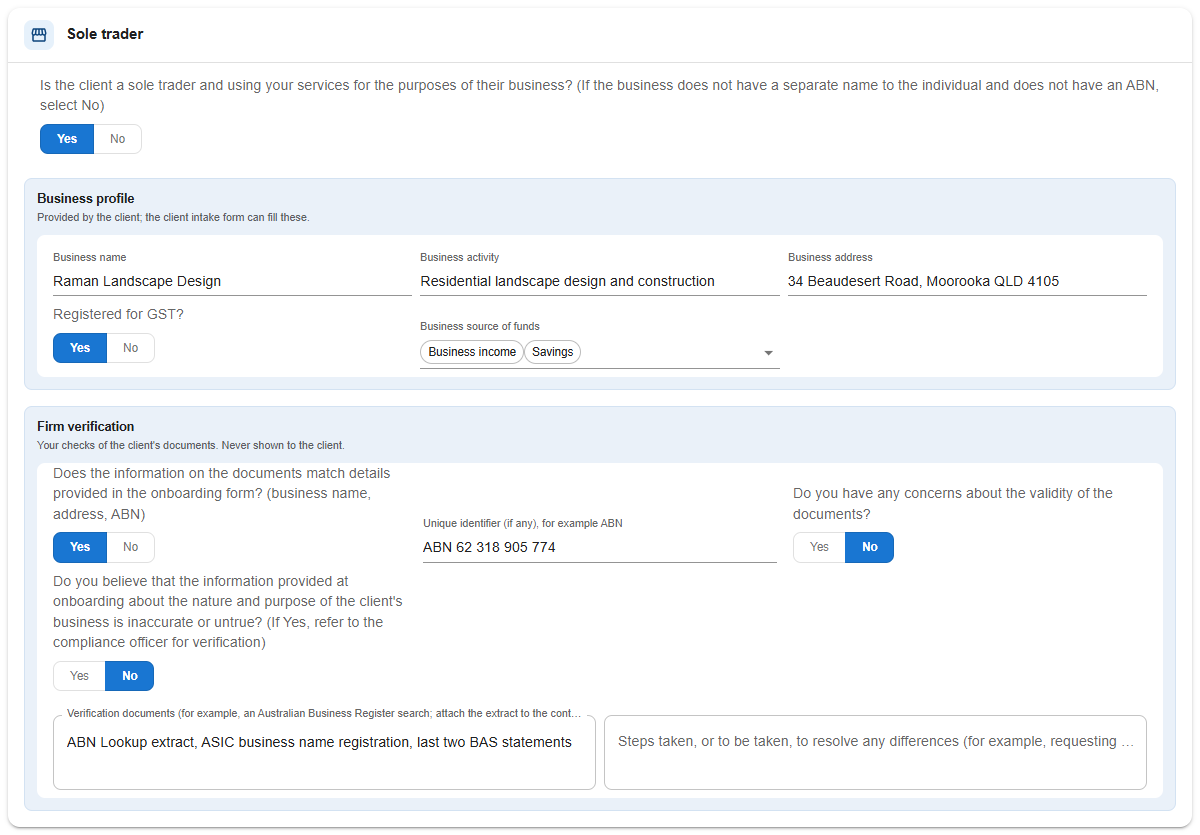 The AUSTRAC form for a sole trader is the same as for an individual, so nothing else changes.
New: the KYC Assessment Record
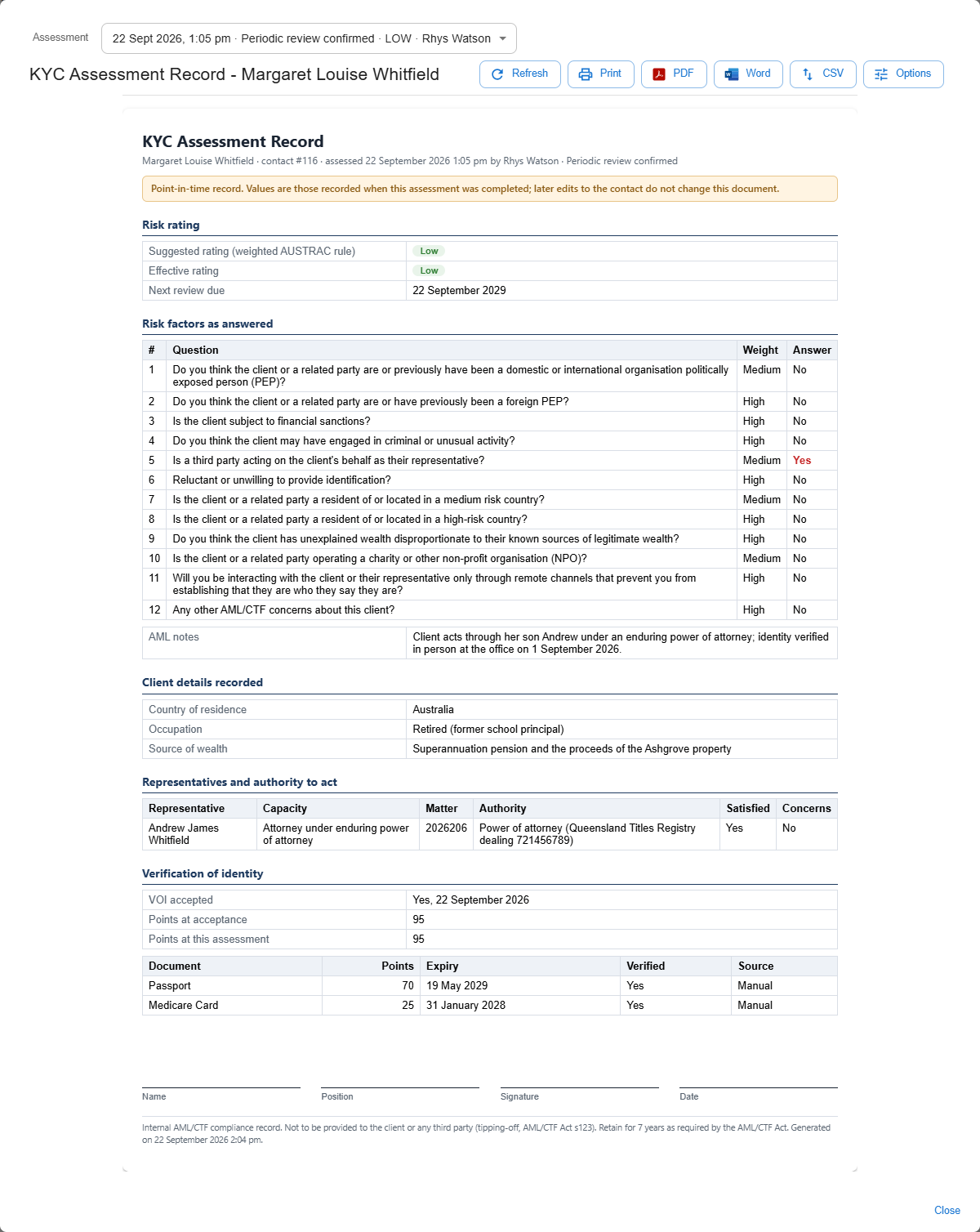
Law App now takes a point-in-time snapshot every time a client’s assessment is completed, a review is confirmed, or a rating override is set or cleared. The snapshot captures the answers and their weights, the suggested and effective rating, the people register and representatives as they stood at the time, and the VOI position (documents, points and acceptance).
The KYC Assessment Record panel on the Identity & AML tab opens a printable record built from the latest snapshot. Older snapshots are listed too, so you can print an earlier one. The record includes a signature block for the person who assessed the client, and you can print or download it from the toolbar.

New: an AML row on the matter — Risk, Report and AUSTRAC Form
On a designated-service matter, the File Details toolbar now has an AML row. It shows the file’s AML status pill, a Risk: Low / Medium / High pill for the matter’s clients, and three buttons.

AML Risk
AML Risk opens the matter-level risk assessment — the same pop-out introduced in the first AML update, now easier to reach.
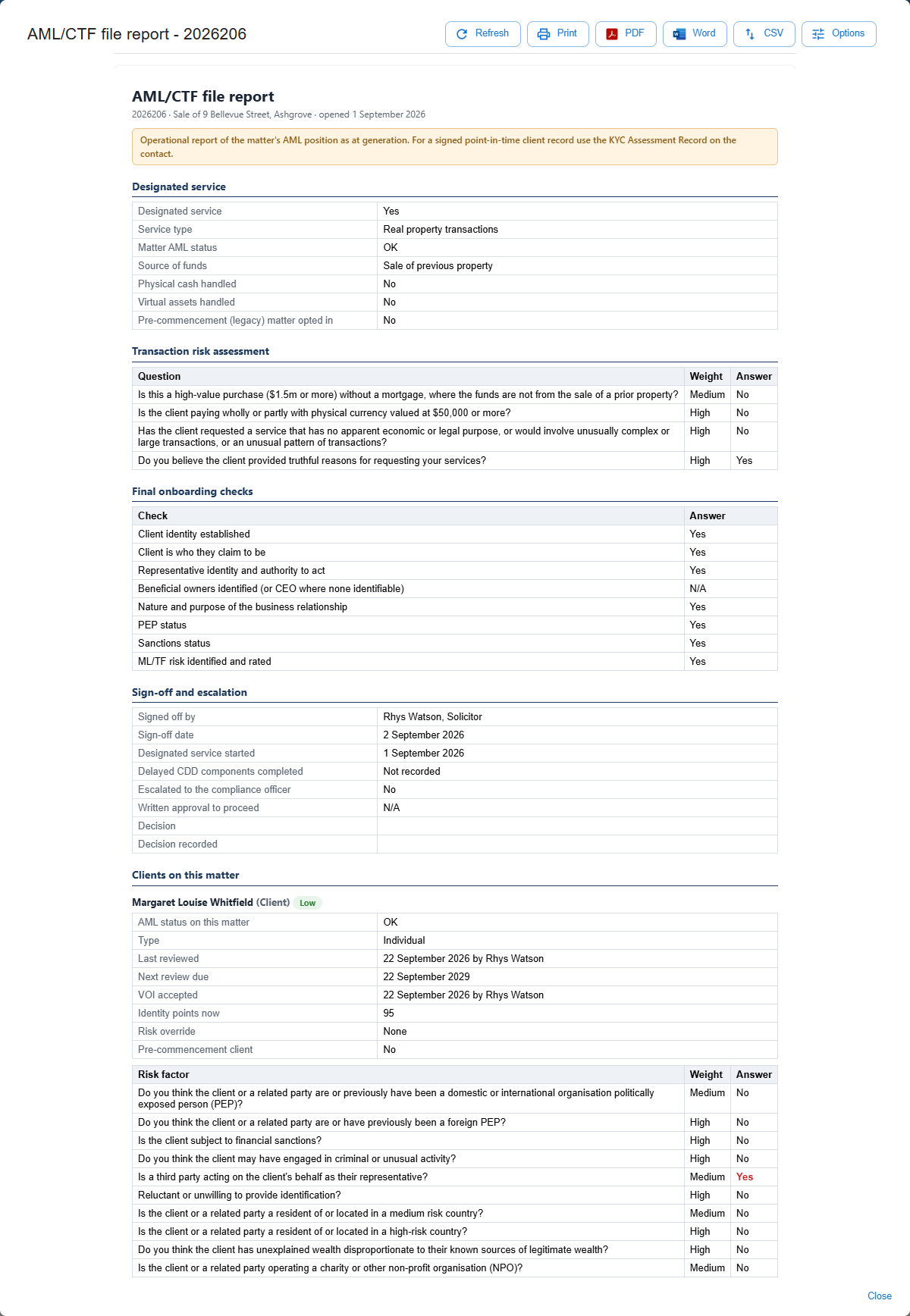
AML Report
AML Report opens a live report for the whole matter. It covers the designated service and its start date, the matter facts, the risk answers, the final onboarding checks, the sign-off, any escalation and its decision, and then each client on the matter with their rating, VOI position, questions, people register and representatives. You can print or download it from the toolbar.
AUSTRAC Form
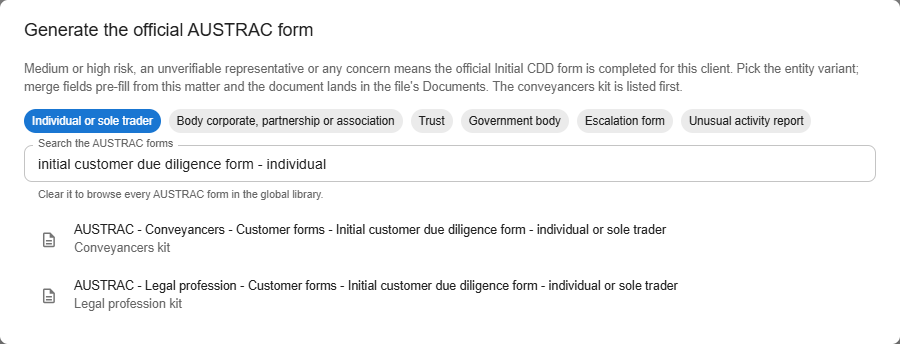
AUSTRAC Form generates the official AUSTRAC customer due diligence form for the matter. The dialog lists the starter-kit forms from Law App’s global template library — the conveyancers kit first on real-property matters, and the legal profession kit first on everything else. Chips let you jump to the right variant (individual or sole trader, trust, body corporate / partnership / association, or government body), and the escalation and unusual activity report forms are there too.
- Click AUSTRAC Form on the matter’s AML row.
- Pick the form you need.
- Choose the folder it should be filed in.
- The form is created in the matter’s Documents with the file code and client name filled in. Open it and complete the rest in Word.
New: the AML/CTF register in Reports
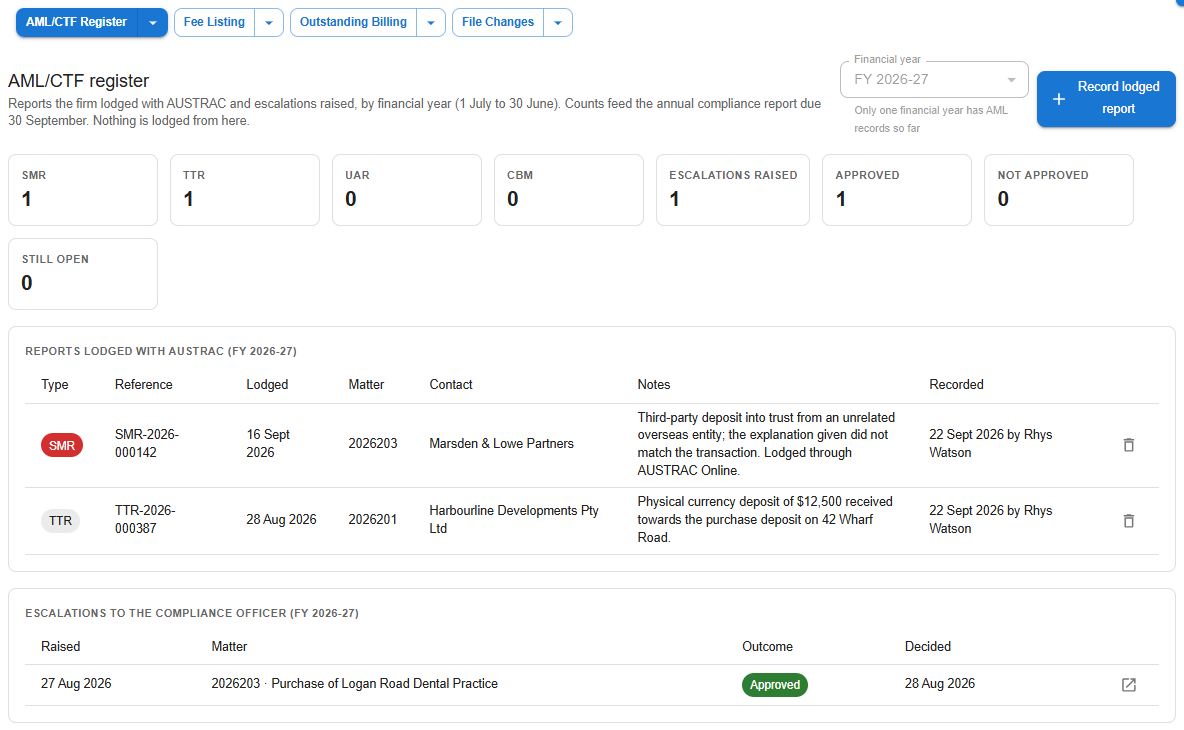
Go to Reports > AML/CTF > AML/CTF Register to see your firm’s internal register of what has gone to AUSTRAC, by financial year (1 July to 30 June).
- Financial year picker. Choose the year at the top. Only years with entries are offered, and the picker is greyed out (with a note) while there’s just one.
- Summary tiles. These count the SMR, TTR, UAR and CBM reports recorded for the year, plus the escalations raised — split into approved, not approved and still open.
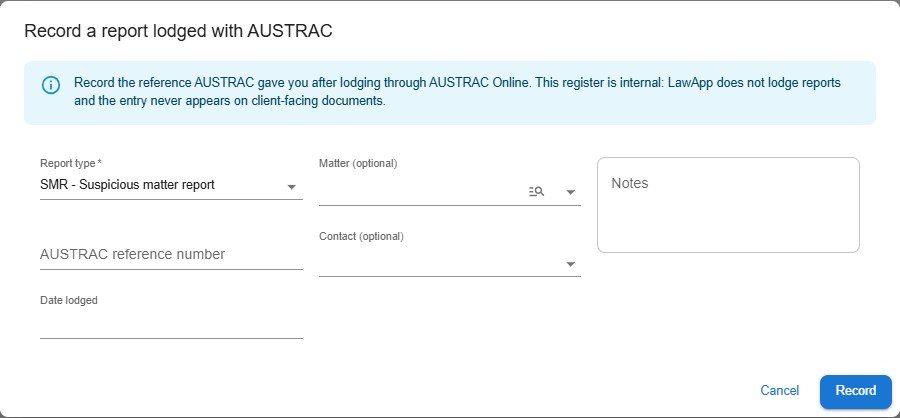
- Record lodged report. Opens a form to capture the report type, the AUSTRAC reference number, the date lodged, notes, and optionally the matter and contact it relates to.
- Entries. Each entry can open the matter’s AML Report. An entry recorded in error can be removed — you’ll be asked to confirm, and the removal is audited.
- Escalations table. Lists every matter escalated to the compliance officer during the year, who raised it, and the outcome.
New for admins: auto-flag matter types as a designated service
Admins can now set matter types that always open as a designated service. Go to Settings > Options > Firm-Wide and find AML designated-service auto-flag.
- Enter the matter type IDs, separated by commas.
- To preset the service type as well, add a colon and the service type after the ID — for example, 16:RealProperty,17:BusinessTransaction.
- Save the setting.
 When a new file is opened on one of those matter types, Is this a designated service? is already set to Yes (and the service type is set, if you gave one), so the AML row and risk assessment are there from the start. Staff can still change the answer on the file.
New: Client Intake declarations flow into the Identity & AML card
If your firm uses Client Intake, you can now add Identity & AML questions to an intake form. These cover the client’s country of residence, occupation, source of wealth, whether they’re a sole trader (and their business profile), the entity type and details for an organisation, and rows for the people behind the entity and any representative.
When you accept a submission:
- New contacts — the declarations are written to the contact’s Identity & AML card as a starting point. Any representatives the client named are created as contacts and linked in the register.
- Existing contacts — if the submission is matched to an existing contact, only blank fields are filled, and the registers are only filled in if they’re empty. Nothing you’ve already recorded is overwritten.
- Anything that didn’t fit — is kept in the AML notes, so nothing is lost.
The submission review page shows an Identity & AML (client declarations) line summarising how many fields, people and representatives the client supplied.
When the official AUSTRAC forms apply
Law App handles standard (low-risk) clients from start to finish, including their people registers and representatives. A new When the official AUSTRAC forms apply panel at the bottom of every Identity & AML tab sets out when you need to go further.
Complete the official Initial CDD form for the client type — using the AUSTRAC Form button on the matter — when:
- the client rates medium or high risk
- the client has an unusually complex ownership structure
- the client can’t provide photo identification, or there are issues with their documents
- a representative’s identity or authority can’t be verified
- initial due diligence is being delayed
- the client has been referred to the compliance officer.
Where your AML/CTF program requires it, escalate using the Escalation form and record the outcome on the matter so it appears in the AML/CTF register.
Leave a Reply